terrain

Wait — your assessment includes Redrock.

Don't walk into the case library cold. Try our Redrock Simulator free and practice the exact format McKinsey uses.

✓ 15+ full-length authentic cases

✓ Detailed feedback on every answer

✓ Free trial — no card required

Try the free Redrock Simulator

15+ cases · 4 phases · exactly like the real test

Start Free
McKinsey Solve · Redrock Module

Master Redrock before test day.

The most realistic Redrock simulator for McKinsey Solve. Practice 15+ full-length cases across Investigation, Analysis, Report, and Cases — exactly like the live assessment. Master question interpretation, the real Redrock challenge.
4.9 / 5
verified Mirrors live Redrock interface
groups 5,000+ candidates
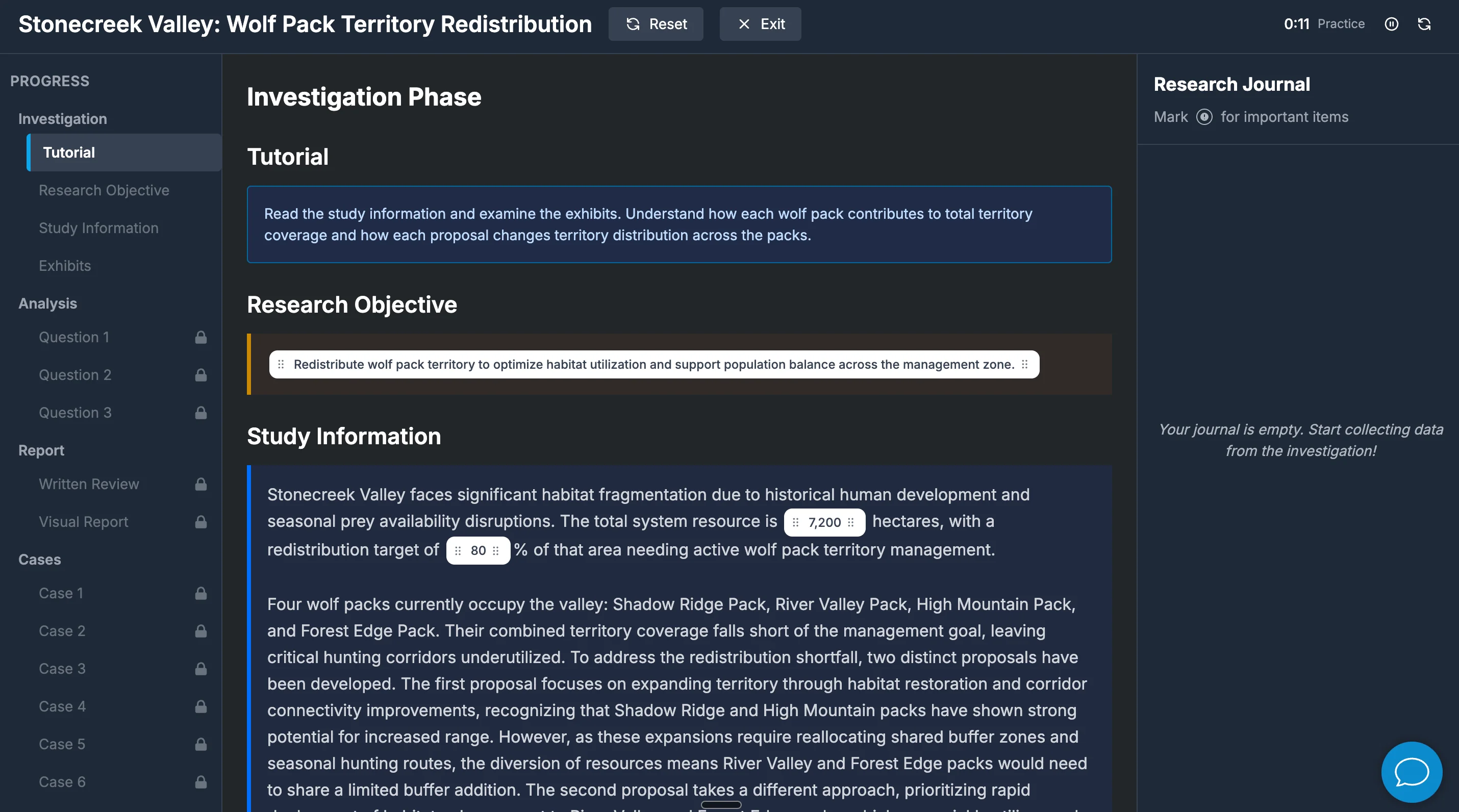
Redrock — investigation phase screen

Trusted by candidates from

Harvard Stanford Oxford Cambridge MIT LSE Imperial Yale Princeton UCL Columbia Berkeley
What is Redrock?

The math isn't hard. The challenge is interpretation.

Redrock is McKinsey's case-study module. You investigate a research scenario — wildlife redistribution, plant restoration, territory mapping — gather data from exhibits, run calculations, and produce a final report. Most candidates get the math right. They lose points by misreading what's being asked.

menu_book

15+ cases

Authentic full-length scenarios — Stonecreek, Yellowridge, Blackridge, and more.

layers

4 phases

Investigation → Analysis → Report → Cases. The full live-test flow.

calculate

1 calculator tool

Interactive calculator with full history — drag results into your answers.

What McKinsey measures

The three skills behind every Redrock case.

Every case surfaces one of these. Train them deliberately and your performance compounds across all 15+ cases.

analytics

Data interpretation

Read research exhibits and journal entries correctly. Spot which numbers matter and which are decoys before you start calculating.

calculate

Calculation accuracy

Use the in-app calculator without arithmetic slips. Drag results into your answers from the calculator's history — exactly as you will on test day.

psychology

Question interpretation

The #1 failure mode. The math is straightforward; misreading what's being asked is what costs candidates points. Our feedback tells you exactly where you slipped.

Inside the simulator

Built to feel exactly like the real test.

From the Investigation exhibits to the calculator history to the Visual Report — every screen mirrors live Redrock.

Redrock investigation phase — research journal drag-and-drop

Phase 1 · Investigation

Research Journal drag-and-drop

Pull data from exhibits into your Research Journal. Same interface, same wording, same friction as the live test.

Redrock analysis phase — interactive calculator with history

Phase 2 · Analysis

Interactive calculator with history

Run calculations and drag any result from history straight into your answers. The exact tool McKinsey gives you.

Redrock report phase — populating charts and visual report

Phase 3 · Report

Visual Report & chart selection

Choose the right chart, populate it with your findings, and write up the conclusion — exactly like the real assessment.

The complete toolkit

Prep every module of McKinsey Solve.

Your free trial includes simulators for all three modules — plus the only solver that helps with both Sea Wolf phases.

You're here
Redrock Simulator preview

terrain Redrock Simulator

  • check_circle 15+ full-length cases
  • check_circle Interactive exhibits, 4 phases
  • check_circle Performance analytics
Try Redrock
Sea Wolf Simulator preview

Sea Wolf Simulator

  • check_circle All 4 phases, realistic UI
  • check_circle Practice & assessment modes
  • check_circle Detailed feedback per phase
Try Sea Wolf
SFL Simulator preview

SFL Simulator

  • check_circle 20-minute timed missions
  • check_circle 13 interconnected scenarios
  • check_circle Trait-aligned feedback
Try SFL
Sea Wolf Solver preview

Sea Wolf Solver Premium

  • check_circle Phase 3 + Phase 4 support
  • check_circle Instant optimal solutions
  • check_circle Keyboard shortcuts, undo
See the Solver
Module comparison

Redrock is the case-study heart of McKinsey Solve.

Most candidates' scores live or die on Redrock. Here's how it compares to the other modules.

Module Focus
terrain Redrock Quantitative reasoning
Sea Wolf Logic & optimisation
SFL Situational judgement
lightbulb

Why interpretation beats arithmetic

Internal McKinsey scoring weights correctness heavily, and the most common reason candidates lose marks isn't bad math — it's answering a slightly different question than the one asked. Our simulator's feedback tells you exactly when your interpretation drifted, so you can train the failure mode that costs the most points.

How it works

Four phases. One realistic case-study flow.

1

Investigation

Read the brief, study the exhibits, and pull the right data into your Research Journal. This is where strong candidates separate signal from noise.

2

Analysis

Use the calculator to run computations, then drag results from the calculator's history straight into your answers — exactly the live test workflow.

3

Report

Choose the right visualisation, populate it with your findings, and write up the conclusion for the main case.

4

Cases

Tackle the unrelated quick-fire Cases section, then review trait-level feedback across all four phases before the next case study.

Questions, answered

Frequently asked questions.

What is the McKinsey Redrock case study? add
Redrock (sometimes called Red Rock) is the case-study module of the McKinsey Solve assessment. You investigate a research scenario — wildlife redistribution, plant restoration, territory mapping — gather data from exhibits, run calculations, and produce a final report. It tests data interpretation, calculation accuracy, and most importantly question interpretation.
How long is the Redrock module? add
Redrock takes around 35 minutes within the standard 65-minute Solve assessment (Redrock + Sea Wolf), or roughly the same within the 85-minute version that adds SFL. Each case has an estimated time displayed before you begin so you can pace yourself.
Why is question interpretation the hardest part? add
Most candidates can do the math. They lose points by answering a slightly different question than the one being asked — a swapped denominator, a misread scope, the wrong unit. Our simulator's feedback tells you exactly when your interpretation drifted so you can train the failure mode that actually costs marks.
How realistic is the simulator? add
Our simulator mirrors the live Redrock interface and wording exactly: research journal drag-and-drop, calculator with history tracking, the same three-phase Investigation → Analysis → Report flow, and the unrelated Cases section. We've built 15+ full-length authentic scenarios — Stonecreek, Yellowridge, Blackridge, Eagleridge, Wildwood Plains, Marshland Plant Restoration, and more.
Is there a free trial? add
Yes. You can start a free trial without entering a card. The trial gives you access to a sample Redrock case plus our Sea Wolf and SFL simulators so you can prepare for the full assessment.
Ready when you are

Walk into Redrock already familiar with it.

Free to start. No card required. 15+ full-length cases — give yourself the same realistic practice McKinsey will measure you on.